You can refer how to install Jetelina in your server in below video.
The instruction steps:
- install Julia
Jetelina requires Julia (10.0<=). Get it from Julia site, then install it on your server. - Install the database you want to use
You may already have it, but if not, install it. Jetelina requires at least one RDBMS, whichever PostgreSQL or MySQL, for managing Jeteina’s users and something else. Of course, you can use both at once and also other DBs: redis, MongoDB, are same as well. - Install Jeteina
In the video, introducing how to do it in case of Linux
(1) Download Jetelina from this site.
(2) Defrost it at your favorite path.
(3) Go to ‘../Jetelina/bin’ in the path and type ‘repl’ command in your console. ‘repl’ is a start command of Genie server, which Jetelina works on it.
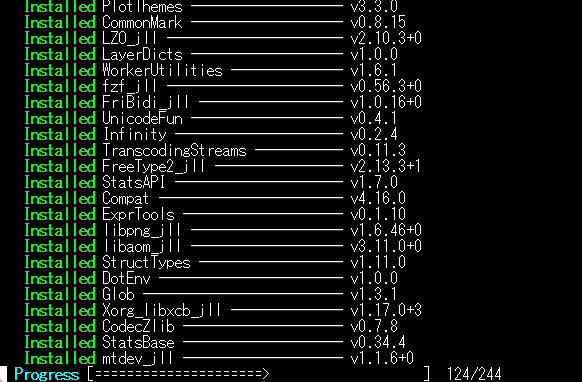
(4) At first, you will see Genie fetching some Julia libs that are related with running Jetelina. Refer to the figure below.
(5) After finishing all fetching libs, ready to start.
(6) Type ‘up()’ command in your console, this is to start Genie server.
(7) Type ‘exit()’ is to stop Genie server, not ‘exit’, don’t forget including ‘()’.
You may have noticed ‘repl → up()’ is for interactive server running, I mean the server is halted if the runninc console is closed.
The ‘bin/server’ command is for running it as a background process, but as you know some present Linux system call ‘hup’ signal when you close your console.
In that case, this may will help you.
(a) Install ‘nohup’ into your system.
(b) Type ‘bin/jetelina_kickstart’ in your console. This shell program runs ‘repl → up()’ with ‘nohup’
Attention: this shell program expects ‘nohup’ in ‘/usr/bin/nohup’, you should change it in the ‘jetelina_kickstart’ file with your server environment. - Initialize Jetelina
Access to Jetelina with a browser: e.g, http://localhost:8000/jetelina/, then start initialize Jetelina process.
Genie fetching some Julia libs, only at the first time.